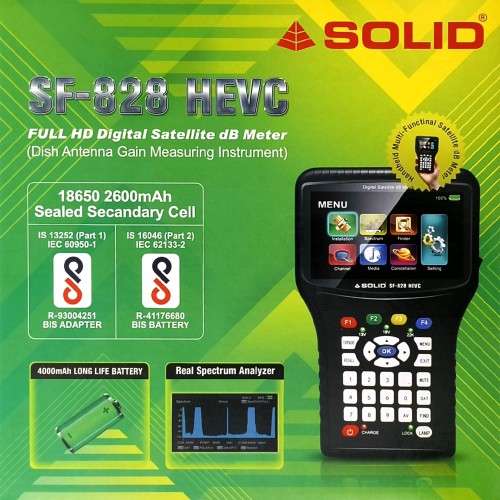
SOLID SF-828 HEVC Full HD Digital Satellite dB Meter
Product Highlights
Select Offer
 ₹6,500
Buy Now
₹6,500
Buy Now
Product Description
SOLID SF-828 HEVC Full HD Digital Satellite dB MeterNow you can check audio and video for FTA satellite TV channels. This meter is an upgraded version of SF-810 and comes with HEVC technology.General FeaturesDVB-S/DVB-S2 Constellation and Spectrum Analyzer supported4.3 “inch definition TFT LCD screenMeasurement of BER, MER, C/NCCTV camera Tester supported13V/18V/22KHz/Lock/Power status displayDISEqC 1.0/1.1/1.2/USALSMulti-media Payout supportedMultilingual OSD for worldwide useUSB2.0 interface available for software updateLED torch and stereo- loudspeaker inside4000mAh long-life rechargeable Li-ion batteryProduct OverviewPower Key: Press the power key for 3s to turn the unite on/offLCD Screen: Shows menus and parameters clearlyPower light: Indicates the power statusRed: The unit is switched on or in chargingRed flashing: The unit has been short-circuitedRed/Green alternating flashing: The unit needs to be charged or it is fully chargedLamp Light: switch on/off the utility LED on the back22K Hz/ 13V/18V lights: Indicate the 22K Hz/ 13V/18V statusFunction keys: F1-F4, to access functions indicated on the displayArrow key and OK key: Press the arrow key to select the desired function then press OK to confirm8. MENU key: Enter the main menuEXIT key: Exit from the present menu back to the previous menu10. SAT key: To start satellite searchFIND key: Enter the packet control menu, You can find the information about transponders quicklyTV/RADIO: To switch between TV and Radio servicesRECALL: Show the previously viewed channel or listIII. Technical parametersDVB-S/S2 Measurement Modulation typeQPSK 8PSK 16APSK 32APSK Symbol Rate1Mbps-60Mbps Frequency Range950MHz-2150MHzInput Signal Level-65dBm-25dBmInput Impedance75 ohmCode Rate1/4 , 1/3 ,2/5 ,1/2 ,3/5 , 4/5 ,5/6 ,8/9 , 9/10LNB Switch Control22KHz DisEqC 1.0/1.1/1.2DiSEqC1.0/1.1/1.2/1.3(USALS) General FeaturesOperating Temperature0 degree calicoes~50 degree calicoesAC/DC AdapterINPUT: AC 100V-240V 50/60Hz OUTPUT : DC 12V/1.5ALi-ion Battery5000mAh/ 7.4 RechargeableCharge timeAbout 4 hoursWorking timeAround 3-4 hours (fully charged)Weight0.6 KGDimension (W*H*L)200mm*120mm*60mm CCTV TESTERFormatCVSB (basic) TV 14.0/V12.0/AHD3.0(OPTION) DVB-T/T2 Measurements (OPTION)Modulation TypeQPSK, 16QAM,256QAMConnector TypeF-TYPEFrequency Rate VHF:174-230MHz UHF:470-858MHz DVB-C: 44MHz-864MHz VII. Standard Accessories User’s manual Adapter F-type connector Li-ion Battery 5000mAH/7.4 Rechargeable OPTIONAL ACCESSORIES -HDMI cableAV cableDC- Micro USB power cableCar charger/power cableBNC-AV connectorNylon Bag & Straps IV.System SettingTime Setting Change the settings of the time /time zoneSoftware Upgrade Software update by USBFactory Reset Reset all settings to factory default, the password is 0000.Main Menu-> Setting-> SettingLanguage change the language of Menu / Audio/ Subtitle/TTX/EPGNetwork SettingOther DC 12V output on/offOptional Functions 1. DVB-T/T2Main menu-> Installation-> DVB-T to setting and according to your region to find DVB/T2 signal and channels DVB-C settings (option)Main menu-> Installation-> DVB-C to settings and according to your region to find DVB-C signal and channels3. CCTV MonitorThis model supports a CCTV monitor function, connecting your composite camera signal correctly and pressing the AV button to activeConnect the CCTV camera signal cable with finder BNC to AVConnect the CCTV camera with the finder via a power cable (12V out interface)Enter the Main menu – system setting – other power supply: Switch to ON”Satellite Meter SetupInstallation Press the MENU key to show the main Menu and enter the satellite installation mode.Antenna SettingMain Menu->Installation->Antenna Setting Enter the satellite setting to select. Use (/) Buttons to set LNB DiSEqC and TP . When all parameters are confirmed, press OK to start searching for channelsSatellite SettingMain Menu->Installation-> Satellite List Press OK to enter the satellite settings, On this page, you can change the setting of pre-programmed satellites. Also, you can delete/add/edit/search manuallyCalculationMain Menu->Installation->Calculation Press OK to enter the calculation function, choose the satellite you want to find, input your local Longitude and latitude, press OK and finder will calculate Azimuth/ Elevation / Polarity for you.FinderMain Menu-> Finder->DVB-S2 press OK to enter the DVB-S2 signal finder function, choose the satellite you want to find.SpectrumMain Menu-> Spectrum In this menu you can see the strength of all received transpondersConstellationMain Menu-> Constellation enter into the constellation mode.
Customer Ratings & Reviews
No reviews yet. Be the first to review this product.